Software & tools ·
Insurance Commission Statement Import Template: Columns, Cleanup, and Validation
By SplitVerde editorial team · Insurance agency operations
Prepare carrier commission CSV and Excel files with the right columns, signed amounts, and validation checks. This guide focuses on the evidence and practical steps needed to make the result trustworthy.
Choose the transaction fields
Capture carrier, statement period, policy identifier, transaction date, transaction type, signed commission amount, and source row reference. Insured name, premium, rate, and producer can help investigation but may not exist in every carrier export. Avoid inventing missing data just to satisfy a template. Keep the original file untouched and record when it was downloaded. A consistent import table should make source evidence easier to locate, not replace the source itself.
Before treating a number as final, ask which source supports it and what period the source covers. A policy effective date, a carrier statement date, and a bank deposit date can all be different. Keep those distinctions explicit. If a carrier changes a schedule or revises a statement, retain the prior evidence and record the reason for the new interpretation. A reviewer should be able to reproduce the conclusion without relying on someone's memory or a screenshot of a summary total. This discipline matters most when an apparent discrepancy crosses month-end or affects producer compensation.
Map headers without guessing
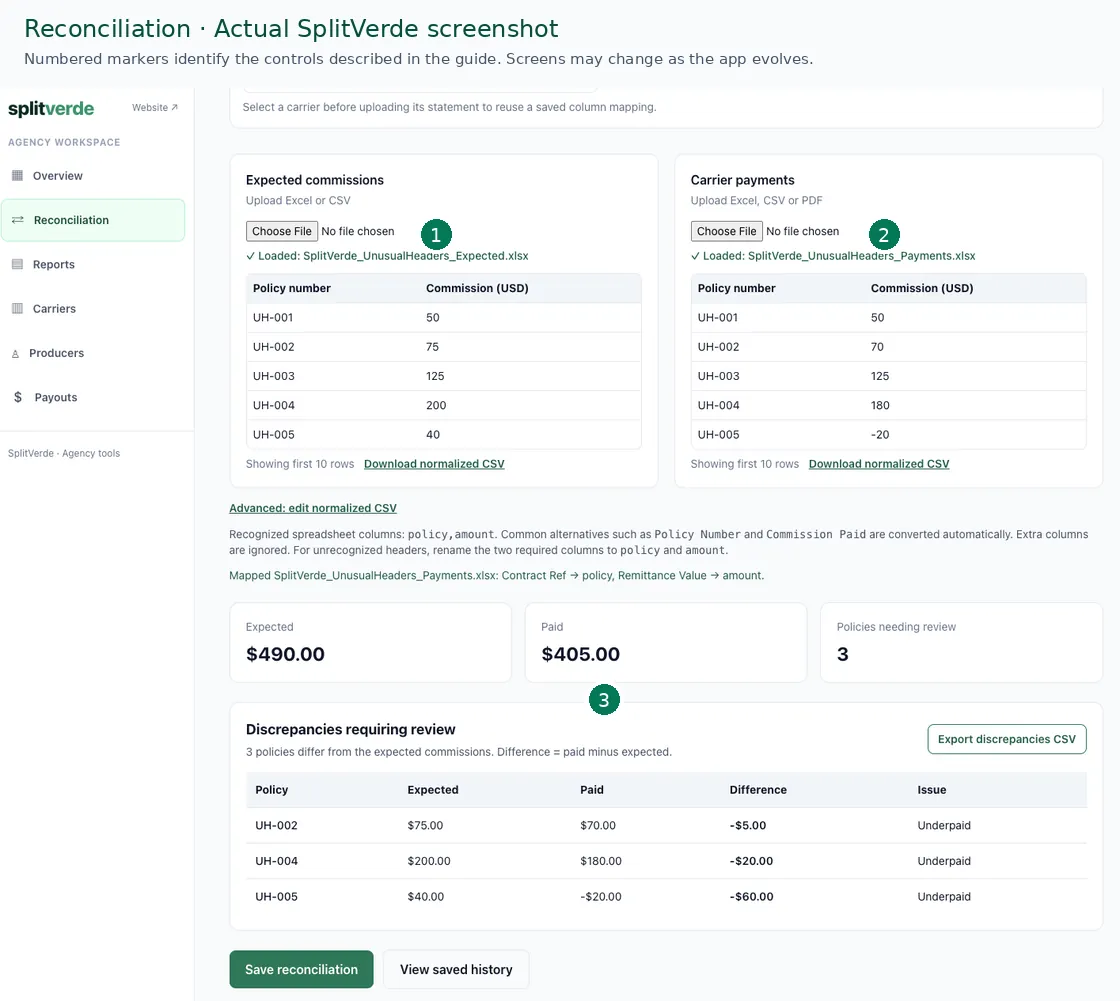
A carrier may call its amount field Commission, Net Paid, or Agent Amount. Document what each label means before mapping it into a standard column. Do not assume that a net field excludes adjustments or that an effective date equals a statement date. Keep a small carrier-specific mapping guide with an example row. When the carrier changes its layout, test the mapping again before importing the entire period.
Be careful with the difference between missing information and a confirmed error. A blank field, absent statement, or uncertain matching key does not prove the carrier underpaid. It means the record needs investigation. Mark that status clearly, assign ownership, and keep a next review date. This protects the agency from wasting time on false alarms while ensuring real shortages remain visible. When asking a carrier for help, provide the policy reference, relevant period, expected amount, and the evidence behind the question.
Protect identifiers and negative numbers
Treat policy numbers as text so leading zeros, letters, and long identifiers survive spreadsheet import. Preserve signs on reversals and chargebacks. Parentheses may indicate a negative amount in some files, while other carriers use separate debit and credit columns. Verify the convention against the original statement. A $120 commission and a $30 reversal should total $90, not $150. Formatting mistakes can produce convincing but incorrect matches.
An accurate reconciliation can still be incomplete if the input is wrong. Validate imported transaction counts and signed totals against the original statement. Inspect a sample of negative adjustments and identifiers with leading zeros. A matching grand total can hide two offsetting policy errors, and a successful upload does not guarantee correct extraction. Stop when a source validation fails; otherwise the matching engine may produce dozens of convincing but meaningless exceptions. Preserve the failed import and the reason for correction.
| Policy | Expected | Reported | Difference |
|---|---|---|---|
| A | $200 | $250 | +$50 |
| B | $200 | $150 | −$50 |
| Total | $400 | $400 | Two exceptions |
Illustrative amounts, not actual carrier transactions.
Validate counts and totals
Compare the number of imported transaction rows against the source, excluding header and summary rows. Compare the signed amount total, then spot-check identifiers, dates, and negative transactions. A matching row count cannot detect a shifted amount, and a matching total cannot detect two offsetting errors. If either control fails, stop before reconciling. Record the reason for any manual correction so the next month's import does not repeat the same mistake.
Build the workflow around distinct transaction states. Expected is not the same as reported; reported is not the same as deposited; a calculated producer share is not the same as an approved or transferred payout. These categories may be related, but merging them hides the cause of a delay. A useful dashboard shows where the transaction sits and which evidence is missing. That makes it possible to answer a producer's question without claiming money was received before it reached the agency.
Understand PDF limitations
Text-based PDFs can contain extractable transaction tables, but visual alignment does not guarantee that extracted text follows the same row order. Repeated page headings and page breaks can move amounts next to the wrong policy. Scanned-image PDFs are different and may require recognition capabilities that are not supported by the same workflow. Inspect sample extracted rows and compare totals before accepting any PDF import. A completed upload is not proof of correct extraction.
Negative amounts deserve the same attention as positive commissions. A chargeback may reflect cancellation, premium change, rewrite, or correction. Keep the original payment and the negative event separately with their own statement dates. Do not overwrite the original with the net result. Whether the negative event affects a producer payout depends on the governing agreement and applicable law. Record the investigation and approval rather than letting a spreadsheet formula silently decide compensation.
Keep a reusable carrier playbook
Document the preferred file format, worksheet or table, date convention, amount sign rule, identifier treatment, and last verification date for each carrier. Store a known-good sample. When a carrier changes its portal, test the new export with those checks rather than assuming the old mapping still works. A short playbook lets a colleague reproduce the process without reverse-engineering your spreadsheet formulas.
At the end of the period, retain the original statement, matching results, unresolved exceptions, carrier correspondence, and review decisions. Keep open items assigned to a person and a follow-up date. A promised correction is not verified until a later statement contains the relevant transaction. Bank-deposit matching should be performed separately from policy-level commission review. The objective is not to make every cell green; it is to create a reliable explanation for the money the agency expected, the carrier reported, and the agency actually received.
Frequently asked questions
Does a matching statement total mean every policy is correct?
No. Offsetting policy-level errors can produce the same grand total. Check each relevant transaction.
Should unresolved matches be automatically approved?
No. Keep uncertain matches visible until sufficient supporting evidence establishes the correct transaction.
Does a negative carrier commission automatically reduce producer pay?
Not necessarily. Review the applicable producer agreement and law before making compensation adjustments.
Related guides
Read our reconciliation overview, file format comparison, and monthly checklist.