Software & tools ·
CSV vs. Excel vs. PDF Insurance Commission Statements: Which Is Best?
By SplitVerde editorial team · Insurance agency operations
The file extension on a carrier statement can determine whether reconciliation takes ten minutes or the better part of your afternoon.
The takeaway
Keep the original carrier data, document what you expect, and investigate differences at the transaction level before approving payouts or closing the month.
Why file format matters
Reconciliation relies on identifying individual commission transactions reliably. CSV and Excel files usually expose rows and columns directly, while PDFs are primarily designed for presentation. A clean spreadsheet can still have inconsistent fields, and a text PDF can sometimes be parsed accurately. The practical question is whether the file preserves policy identifiers, dates, transaction descriptions, and signed amounts without manual reconstruction.
CSV: simple and predictable when structured well
CSV is a plain-text table format that many systems can import. It is easy to inspect and often efficient for large transaction lists. But it has limitations: no built-in types, possible delimiter differences, inconsistent date conventions, and leading-zero policy numbers that spreadsheet applications may strip. Inspect a sample before transforming the data, and retain the original export.
Excel: useful but not automatically clean
Excel workbooks can include multiple sheets, formulas, formatted headings, hidden rows, and summary tabs. Those features are helpful to a human reader but can confuse import logic. Identify the actual transaction table and validate whether amounts are stored as numbers. Avoid accidentally importing totals as transactions. Keep a repeatable mapping for carrier exports that use the same layout each month.
| Transaction | Expected | Reported | Next step |
|---|---|---|---|
| Policy A · renewal | $240 | $240 | Matched |
| Policy B · new | $180 | $120 | Check $60 variance |
| Policy C · adjustment | Review | −$75 | Trace original |
Text PDFs versus scanned PDFs
A text-based PDF may contain selectable transaction data. A scanned PDF is essentially an image and may require OCR, which can introduce character and table alignment errors. Even text PDFs can split one transaction across multiple lines or pages. Do not assume that every PDF can be parsed perfectly. Check row counts, policy identifiers, and statement totals before trusting the result.
Compare the formats on the same test set
Take one carrier period and verify its transaction count and total manually. Export or obtain equivalent CSV, Excel, and PDF versions when available. Import each into your workflow, then compare matched records, exceptions, and time spent correcting data. Use the same baseline so the comparison is fair. The easiest format is the one that preserves the necessary details with the fewest ambiguous transformations.
Set up a safe fallback
When a carrier provides an unsupported or unreliable format, use a documented manual review process. Preserve the original file, note any conversions, and validate totals and representative transactions. Never silently discard rows that fail parsing. A visible exception is preferable to an invisible omission. File compatibility should be tested with your own carriers before adopting any software.
Choose tools based on evidence
Ask vendors which formats and PDF types they actually support, whether uncertain records are flagged, and how to inspect the source row behind a match. If you are evaluating SplitVerde, test your own supported CSV, Excel, and text-based PDF statements. Do not assume scanned-image OCR or direct carrier integrations. Reliable reconciliation depends on the quality of the imported data as much as the matching logic.
Example: how an Excel import creates a phantom missing payment
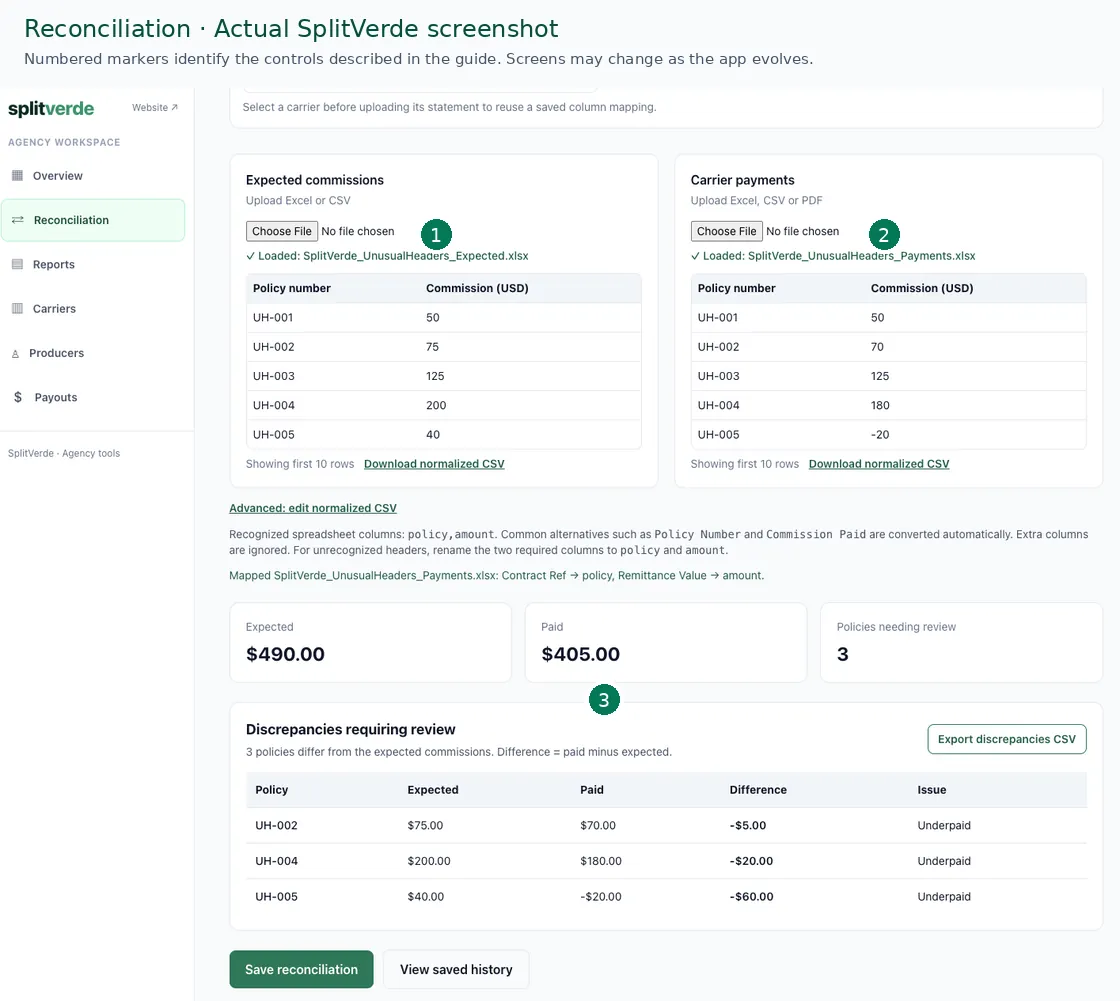
A carrier exports policy 00123456 in CSV. Someone opens the file in spreadsheet software, which interprets the identifier as a number and removes the leading zeros. The expected ledger still contains 00123456, so a literal comparison reports an unmatched payment. The problem is formatting, not necessarily the carrier. Treat policy numbers as text and inspect sample identifiers before importing hundreds of records. Do not blindly strip all zeros, because different policy identifiers can become identical after aggressive normalization. Check dates and negative amounts as well. CSV has a simple structure but no built-in type definitions. Excel may contain multiple sheets, formulas, hidden rows, and summary totals that should not be treated as transactions. A successful upload is not proof that every row was interpreted correctly. Compare transaction counts and signed totals against the original statement before investigating supposed shortages.
Why PDF statements deserve an extra validation step
A PDF can display a perfect-looking table while storing its text in a fragmented order. A parser might associate a commission amount with the next policy number, especially across page breaks or repeated headers. A scanned PDF adds recognition risks, including confusion between similar characters. Text-based PDFs may be usable, but that does not mean every PDF is supported or every extracted row is reliable. Review a sample of policy identifiers, transaction types, and signed amounts after import. Keep uncertain records in an exception queue rather than silently forcing a match. Document a preferred export format and known quirks for each carrier. If a carrier changes its layout, test the new file against a previously verified period before using it for producer calculations. For SplitVerde specifically, evaluate supported CSV, Excel, and text-based PDF files; do not assume scanned-image OCR or direct carrier integrations.
Frequently asked questions
Is CSV better than PDF for commission reconciliation?
Often for structured imports, but quality depends on the carrier export and the fields included.
Can all PDF commission statements be imported?
No. Scanned and complex layouts may require OCR or manual validation.
Why do policy numbers change in Excel?
Automatic number formatting can remove leading zeros or alter long identifiers. Treat policy numbers as text.
Keep learning
Explore our insurance commission reconciliation guide, statement reconciliation walkthrough, and producer payouts guide.